

"Plantiva: Your Pocket Plant Care Buddy"
Project Overview
Plantiva is an AI-powered mobile app designed to help plant owners identify their plants, diagnose issues, and get simple, personalized care tips.
Project Duration: 7 weeks
My Role: UI/ UX Designer
Tools used: Figma/ Photoshop
The Problem
Many plant owners love the idea of having greenery at home, but struggle with day-to-day care. They often notice yellow leaves, brown tips, or drooping plants and aren’t sure what’s wrong or how to fix it. Most turn to Google or YouTube and get overwhelmed by conflicting information.
Solution
To build a simple, friendly app that instantly identifies plants, explains issues in a clear way, and gives easy care tips that help plants thrive.
Design
Process
Designing a smooth and intuitive experience meant using a structured process centered around real user needs. By grounding every step in user insights, we shaped Plantiva to address core pain points while delivering a simple and enjoyable gardening experience.
Understanding the user
-
User research
-
Personas
-
Problem statements
-
User journey maps
Starting the design
-
Paper wireframes
-
Digital wireframes
-
Low-fidelity prototype
-
Usability studies
Refining the design
-
Mockups
-
High-fidelity prototype
Iteration & Continuous Improvement
-
Keep refining based on evolvinguser needs and business goals.
Test
-
Takeaways
-
Next steps

Empathize
Understanding the Users
User Research
5 in-depth interviews
Interviews
10 user responded
Survey
Qualitative Research Findings
Plants are beautiful, but care is hard to remember
Users love the idea of owning plants, but they struggle with routines. Watering frequency, sunlight needs, and seasonal changes are easily forgotten.

Diagnosis and watering confusion are the biggest pain points
Most users don’t know what’s wrong when a plant starts declining.
They also aren’t sure when to water or how much to water, which leads to overwatering, underwatering, and plant loss.
Information overload and lack of trust
Online advice is scattered and often contradictory.
Users bounce between blogs, forums, YouTube, Reddit, and apps—yet still feel unsure which advice is correct.
Current apps feel complex and overwhelming
Existing plant-care apps are cluttered, require too many steps, and hide simple actions behind confusing navigation.
Users want fewer taps and faster answers.
High demand for an AI-driven, instant, simple solution
People don’t want more information—they want the right information fast.
There is a strong appetite for an AI assistant that instantly diagnoses issues, recommends actions, and simplifies plant care.
Offline access is a key expectation
Plant care often happens where connectivity is weak (balconies, gardens, greenhouses).
Quantitative
Resarch

Key Findings
-
63% struggle to diagnose plant issues
-
58% confused about watering
-
47% are beginners
-
78% rely on Google
-
67% very interested in an AI assistant
-
71% want an all-in-one app

Competetive Analysis
Ease of Use
-
Feature-heavy
-
Can feel cluttered
-
Learning curve
-
Clean layout
-
Diagnosis path is long
-
Ads reduce usability
-
Very intuitive
-
Fast photo capture
-
Pushes too many upsells
-
Not intuitive
-
Built for farmers, not consumers
-
Data-heavy and technical
Diagnosis Accuracy
-
Basic symptom-based diagnosis
-
Not very accurate for early diseases
-
Relies heavily on user input
-
Stronger AI image recognition
-
Can misclassify similar symptoms
-
Good for common pests
-
Best-in-class plant identification
-
Diagnosis is broad, not detailed
-
Often “over-diagnoses” issues
-
Very strong diagnosis engine
-
Designed for agriculture, not houseplants
-
Accurate for pests/diseases
Offline Capability
-
Limited
-
Needs internet for most features
-
Some info cached
-
Diagnosis needs connectivity
-
Identification requires connection
-
Offline is weak
-
Some offline farming database
-
Heavy images still need internet
Personalization & User Support
-
Tailored plans
-
Good for beginners
-
Can feel generic over time
-
Some personalized advice
-
Limited customization
-
Mostly generic tips
-
Not tailored to the user’s environment
-
Not intuitive
-
Built for farmers, not consumers
-
Data-heavy and technical
Planta
PlantIn
PictureThis
Plantix
UX / Usability
-
Polished design
-
feature-heavy
-
multi-step flows Can be overwhelming
Watering Guidance
-
Detailed schedules
-
Adjusts recommendations
-
Can be overwhelming
-
Watering reminders included
-
Lacks nuance for pot size/soil type
-
Generic suggestions
-
Watering tips are high-level
-
Not personalized
-
Not a focus area
-
Barely covers watering
-
Not consumer-focused
-
Not helpful for casual owners
Personalization
-
Personalized schedules
-
manual inputs required
Define
Defining Users - Plantiva

Name: Emma Thompson
Age: 34
Occupation: Marketing Manager
Location: Urban apartment
Tech Comfort: Moderate
Plant Experience: Beginner to intermediate
Indoor/ Outdoor: 7 indoor-plants
“The Busy Plant Parent”
About Emma:
Emma loves having plants because they make her apartment feel warm and lively. She has 6 houseplants but feels unsure how to care for them properly. Her schedule is busy, and she often forgets watering routines or struggles to understand what’s wrong when a plant starts drooping or showing spots.
Goals
-
Keep her plants healthy without stress
-
Get quick, reliable answers when something looks wrong
-
Maintain a regular watering schedule
-
Avoid wasting time browsing blogs or videos
-
Build confidence as a plant owner
Motivations
-
Wants a calm, beautiful living space
-
Likes the feeling of successfully caring for something
-
Wants to avoid the guilt of killing plants
-
Enjoys plants but doesn’t want them to feel like work
Frustrations
-
Cannot identify plant issues early
-
Forgets when she last watered each plant
-
Conflicting advice online
-
Existing apps feel cluttered and overwhelming
-
No offline access when she’s on her balcony or garden area
-
Feels anxious when plants start declining

Name: Daniel Reyes
Age: 45
Occupation: Engineer
Location: Suburban home with backyard
Tech Comfort: High
Plant Experience: Intermediate
Indoor/ Outdoor: 15 total

“Daniel – The Practical Problem-Solver”
About Daniel:
Daniel enjoys plants but approaches them from a practical, problem-solving mindset. He has a mix of indoor and outdoor plants, totaling around 12. He’s comfortable with technology, doesn’t mind learning, but gets frustrated when information feels inconsistent or overly complicated.
He wants clear, evidence-based guidance, not generic tips.
Goals
-
Quickly identify what’s wrong when a plant shows symptoms
-
Avoid spending time digging through multiple sources
-
Get accurate, reliable, science-based recommendations
-
Track plant health in an organized way
-
Manage both indoor and outdoor plants efficiently
Motivations
-
Wants his plants to grow well with minimal guesswork
-
Enjoys solving problems but dislikes wasted time
-
Prefers data-backed answers he can trust
-
Wants to maintain a well-kept home and garden
-
Feels satisfaction when plants thrive due to precise care
Frustrations
-
Online information is repetitive and contradictory
-
Diagnosis tools in current apps lack accuracy
-
Needs clear steps, not vague “water more” or “use fertilizer” tips
-
Apps feel cluttered with too many features
-
Offline access is limited, especially in his backyard
-
Struggles to connect symptoms to root causes
Name: Mark Williams
Age: 60
Occupation: Retired schoolteacher
Location: Rural village
Tech Comfort: Low to moderate
Plant Experience: High (long-time gardener)
Indoor/ Outdoor: 45 total
.png)
“Mark – The Experienced but Low-Tech Gardener”
About Mark:
Mark has been growing plants for decades — vegetables, herbs, houseplants, and small fruit trees. He lives in a quiet village with limited internet connectivity. He’s comfortable with hands-on gardening but not with modern plant-care apps. He finds most apps too complicated and prefers practical, simple instructions.
He values clarity over features and reliability over speed.
Goals
-
Keep his garden and indoor plants healthy
-
Quickly identify unusual symptoms he hasn’t seen before
-
Get simple, actionable guidance
-
Access information even when offline
-
Use digital tools without feeling overwhelmed
Motivations
-
Takes pride in maintaining healthy plants and a productive garden
-
Enjoys teaching others and sharing knowledge
-
Prefers simple solutions that fit his lifestyle
-
Wants technology that “just works” without friction
Frustrations
-
Weak or unreliable internet signals in his area
-
Apps packed with too many menus and buttons
-
Diagnosis tools that require multiple steps
-
Tiny text or cluttered screens
-
Overly scientific explanations that don’t give clear steps
-
Conflicting advice when he searches online

Problem Statement
Emma is a/an busy urban plant owner who loves having plants but lacks confidence in caring for them
who needs simple, timely guidance to know exactly what her plants need and when
because she often forgets watering routines and struggles to understand why a plant is drooping or showing spots.

Daniel is a/an practical, tech-comfortable plant owner with 12 indoor and outdoor plants
who needs clear, evidence-based guidance he can trust
because he gets frustrated when plant care advice is inconsistent, generic, or more complicated than it needs to be.

Mark is a/an experienced lifelong gardener with limited internet access and low comfort with modern apps
who needs a simple, reliable way to identify plant issues and get clear, practical instructions
because most plant-care apps feel overly complicated, feature-heavy, and not designed for the way he prefers to work.
.png)
User Journey Map
Emma – The Busy Plant Parent
Goal: Keep her plants healthy with minimal effort and quick, trustworthy guidance.
Keep instructions short and simple
Add a trust marker (“Powered by expert data + AI”)
Use visuals to show what to do
Smart reminders based on plant type
Simple progress tracking
Encouraging notifications
Improvement opportunities
Immediate, simple diagnosis pathway
Use images/icons instead of text
Reassure her with credibility
Reduce steps to two taps
Use a clean, clutter-free UI
AI-guided camera prompts
Instant feedback if image quality is low
Quick processing time
Emotions
Worried
Unsure
Slightly frustrated
Curious
Hopeful
Wants fast answers
Focused
Slightly impatient
Wants accuracy
Relieved
Confident
Motivated
Empowered
Proud
Trust builds in the product
A. Spots yellow
/Brown leaves
B. Feels unsure what caused it
C. Looks for quick help
Task
List
A. Opens the app
B. Selects “Diagnose Plant”
C. Gets ready to take a photo
A. Snaps a picture
B. Adjusts angle/lighting
C. Submits for analysis
A. Reads diagnosis summary
B. Sees top 1–2 actions to fix it
C. Saves care plan
A. Adjust watering or light
B. Set reminders in app
C. See improvement over time
Action
Notices a
plant issue
Open Plantiva
Takes Photo of the Plant
Gets Diagnosis + Quick Fix
Follows Care Plan Easily
Affinity Map - Plantiva Card Sorting
“I ran card sorting to understand how users naturally group plant-care tasks. It helped me shape an information architecture that feels intuitive and reduces cognitive load.”
Easy to use
Simple interface
Simple, icon-driven navigation
Downloadable guide
Photo-based diagnosis
Fertilizer guidance
Visual step-by-step instructions
Offline access
AI-Powered Plant Diagnosis
Daily care reminders
Light meter
Low subscription cost
No login required
Symptom analysis
Soil-type information
One-time subscription cost
Voice input
Low-data mode
Health trends over time
Community
hands free use
care
calendar
Homemade care tips
Organizing/Prioritizing Clusters
Ease of Use/
simplicity
Simple interface
No login required
Simple, icon-driven navigation
low-subscription cost
one-time
subscription
cost
Diagnosis & Problem Solving
AI-Powered Plant Diagnosis
Photo-based diagnosis
Light meter
Symptom analysis
Fertilizer guidance
Care Support & Maintenance
Health trends over time
Daily care reminders
Care calendar
Downloadable guide
Homemade care tips
Fertilizer guidance
Light meter
Soil-type information
Accessibility
Offline access
Hands-free use
Low-data mode
Voice input
Ideate
Crazy 8s

I conducted a Crazy 8s exercise to explore various ways users could quickly diagnose plant issues. It helped me break out of my first idea and identify stronger, more intuitive interaction patterns before moving into wireframes.
Sketching
Sketching helped me translate abstract ideas from Crazy 8s into concrete layouts, clarify screen hierarchy, and quickly test different flows before committing to wireframes.


Sitemap

Storyboard
I used storyboarding to visualize the full user journey in context and validate the main user flow—from noticing a plant problem to getting a clear diagnosis and knowing exactly what to do next.

Userflow

Prototype
Wireframes

User Interface
Home page

Plant Identifier

Plant Identifier - Details
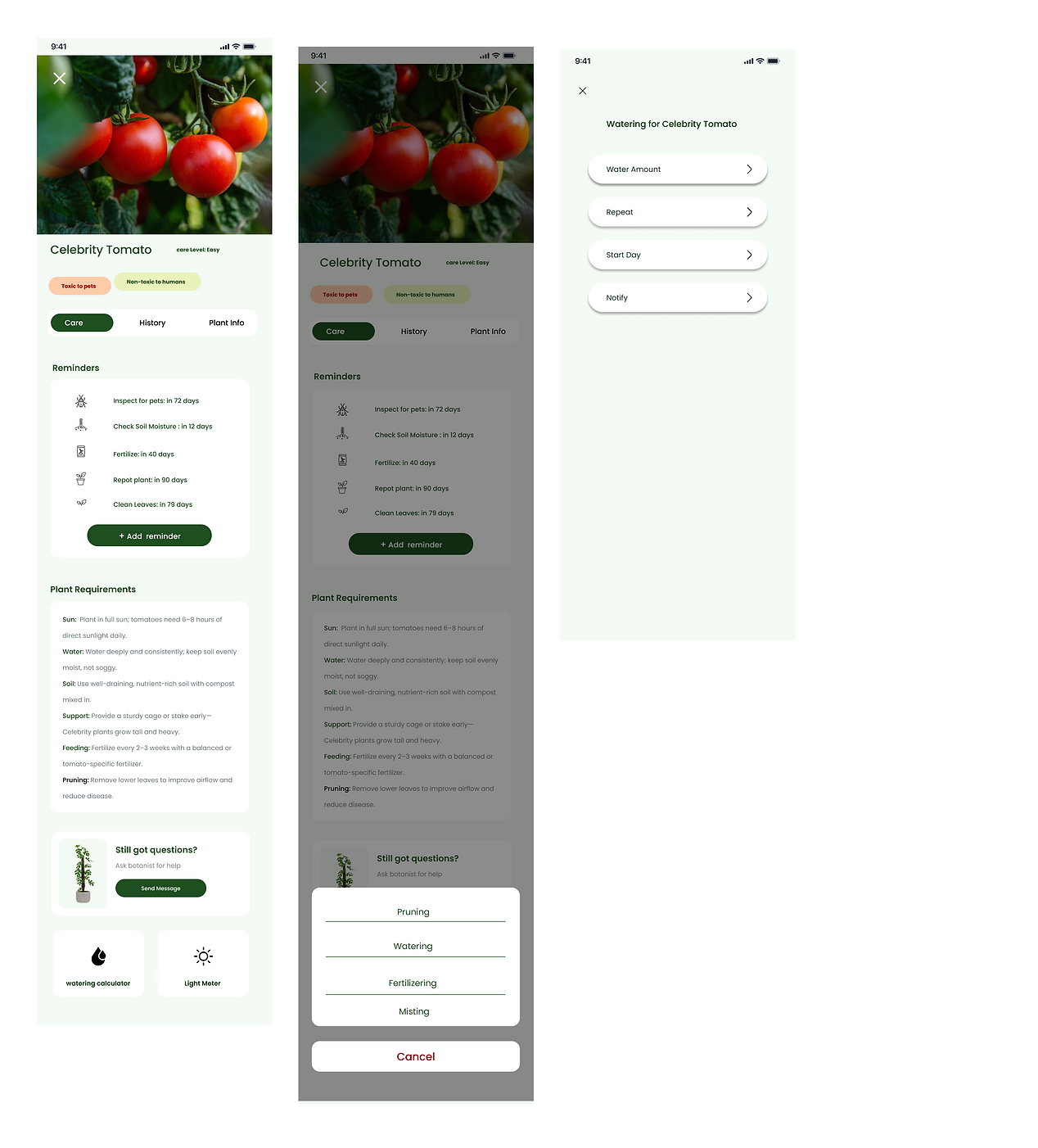
Plant Diagnose - Details

Plant Info/ History


My Plants
Botanist Help (AI)


Sign In/ Sign up
